Best overall: Daycut for daily listening shared across services. Best for a listening widget: Airbuds. Best for a listening history: Last.fm. This 2026 guide compares music sharing apps for long-distance friendships by what you see, what you need to connect, and whether your friends must be online together.
- Daycut leads music sharing apps for long-distance friendships when friends use different music services and want daily cuts.
- Airbuds suits friends who want listening widgets and reactions rather than a daily selection.
- Last.fm suits listening histories; Spotify Blend suits shared playlists; Apple Music profiles suit Apple Music-only groups.
- Choose asynchronous music sharing when your schedules do not overlap.
Why this matters
A song link tells a friend what you chose to send. A listening feed tells a friend what you actually played. Those are different things.
For a long-distance friendship, the first question is not which app has the most features. It is whether the app fits your schedules and music services. A shared playlist works without a live session. So does a daily listening cut. Neither requires coordinating a listening party.
This 2026 ranking puts daily, asynchronous sharing first. Widgets, listening histories, and shared playlists get separate recommendations because they solve different problems.
What makes the best music sharing apps for long-distance friendships
- Service fit: Your Spotify account should not make an Apple Music friend invisible. Check the actual connection route, not just the service name.
- Asynchronous use: You should be able to catch up after your friend has gone offline. Live activity alone is a different use case.
- Sharing effort: Automatic listening records and manually chosen playlists ask different things of you. Pick the habit you will maintain.
- Useful scope: A daily selection, a current song, and a complete listening history are not interchangeable. Decide what you want to see.
- Participation rules: Check whether viewing depends on sharing, whether profiles are visible, and what happens when you skip.
- Device fit: A cross-service app is not necessarily a cross-device app. An iOS-only option does not cover an Android friend.
The best choice is the one your whole group can use for the same job. A detailed history is not a substitute for a simple daily exchange. A shared playlist is not proof of what somebody played today.
The options at a glance
| Rank | Option | Best for | Standout feature | Key limitation |
|---|---|---|---|---|
| 1 | Daycut | Daily cuts across different music services | Automatically assembles up to 10 tracks into a daily cut | iOS only; Spotify connects through Last.fm |
| 2 | Airbuds | Listening widgets and reactions | Friends' listening activity in a social widget format | Activity sharing is not the same format as a daily cut |
| 3 | Last.fm | A lasting listening history | Scrobbles record played tracks on listening profiles | Connections and recording depend on your listening setup |
| 4 | Spotify Blend | A shared taste-based playlist | Combines participants' tastes into a shared playlist | Everyone participating needs Spotify |
| 5 | Apple Music profiles | Friends already using Apple Music | Profiles show shared playlists and listening activity | Does not combine Spotify and Yandex Music activity |
These are use-case rankings, not a claim that every option replaces every other one. Choose the row that matches the exchange you want with your friends.
1. Daycut: best for daily cuts across music services
Daycut is best for iOS friends who want a daily music cut across Spotify, Apple Music, and Yandex Music. It assembles a selection automatically, rather than asking you to choose a song for a post.
You get 1 daily cut of up to 10 tracks, assembled at a shared random moment. Apple Music and Yandex Music connect directly. Spotify listeners connect through a Last.fm account; the current product guidance describes that setup as taking about 2 minutes.
The viewing rule matters. Friends' cuts open after you send yours. If you skip, your cut stays invisible. Automatic assembly does not mean your listening becomes visible without that send step.
Pros:
- Brings supported music services into one friends feed.
- Builds the cut automatically from listening.
- Gives the exchange a defined daily format.
- Makes sharing part of opening friends' cuts.
Cons:
- iOS only, so it does not cover an Android friend.
- Spotify requires the extra Last.fm connection.
- Skipping means your cut stays invisible.
Best for: Friends with iPhones who use different supported music services and want to see what each other played today.
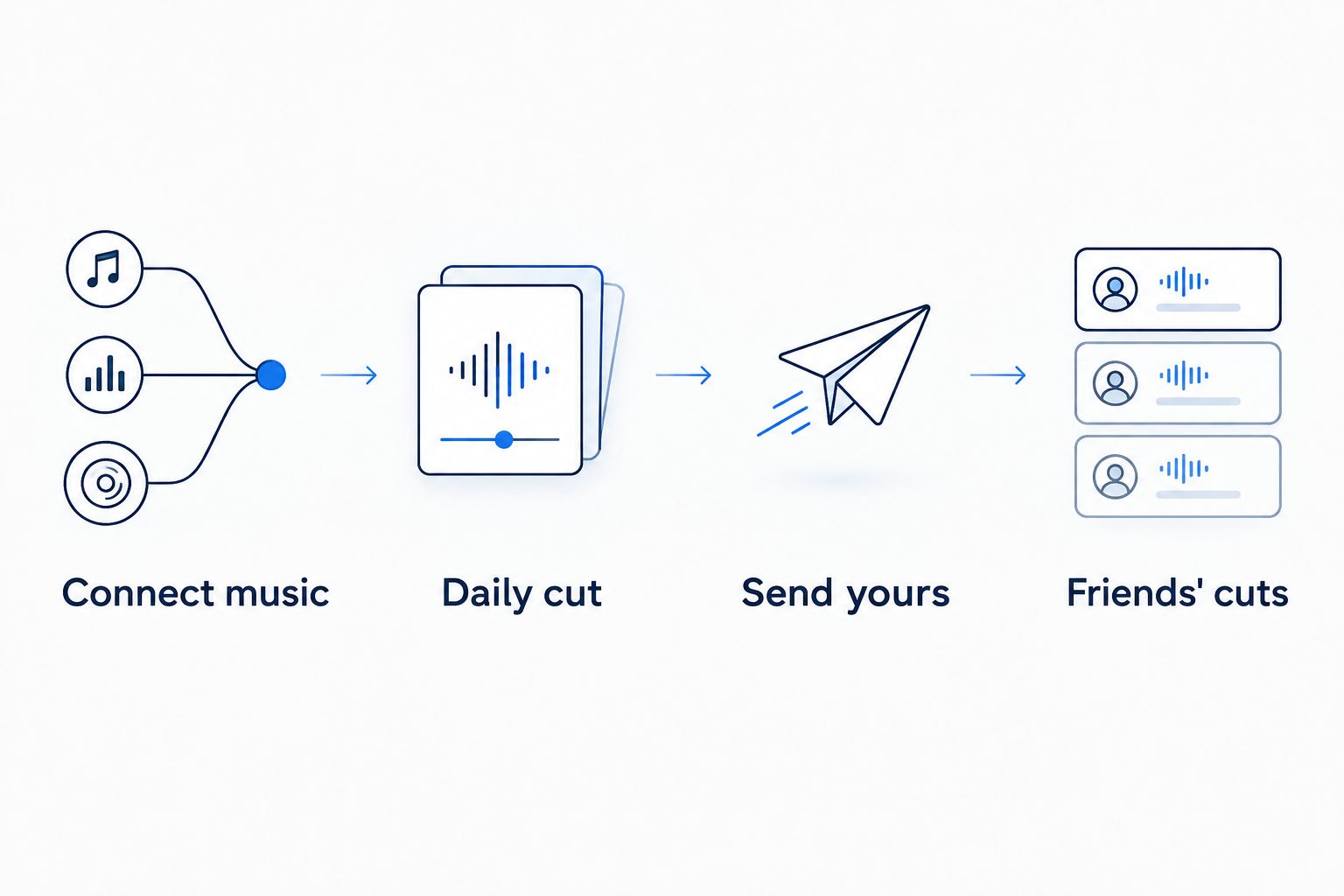
How the daily exchange works
- Connect music: Connect Apple Music or Yandex Music, or use Last.fm for Spotify.
- Daily cut: The app assembles up to 10 tracks at the shared random moment.
- Send yours: Send your cut to open your friends' cuts.
- Friends' cuts: See the daily selections your friends shared.
You are exchanging a daily selection, not trying to catch the same song at the same instant. That distinction fits friends with different schedules. The cut also has a limit: it is not a complete archive of every track played.
For this 2026 comparison, the product mechanics come from the current site information supplied for this guide. SoundCloud is marked as coming soon, not as a supported connection. Installation is through the App Store, not TestFlight.
Verdict: Buy into this format if daily sharing across supported services is the goal. Skip it if Android participation is essential.
2. Airbuds: best for listening widgets and reactions
Airbuds centers on friends' listening activity, widgets, and reactions. Its App Store and Google Play descriptions identify those as the core product mechanics.
Choose Airbuds if you want your friend's music activity to be something you glance at and react to. A widget gives that activity a place outside a full listening-history page. The format is different from sending a bounded daily selection.
Pros:
- Puts friends' listening activity in a widget format.
- Includes reactions around music activity.
- Has listings for both iOS and Android.
Cons:
- A widget's activity view is not a complete listening diary.
- Activity updates are not the same exchange as a daily cut.
- You still need to check the connections for your group's services.
Best for: Friends who want listening updates and reactions on their phones, including groups that need both iOS and Android options.
Do not choose Airbuds only because the word widget sounds convenient. Decide whether you actually want ongoing activity or a daily recap. Those are different habits, even when both show songs.
Source: Airbuds' App Store and Google Play product descriptions, covering listening widgets and reactions. Check the current listings for connection details before asking your group to install.
Verdict: Buy into Airbuds for the widget-and-reaction format. Skip it if a defined daily selection is your main requirement.
3. Last.fm: best for a lasting listening history
Last.fm records listening through scrobbles. A scrobble is a record of a track you played, attached to your listening profile. Profiles and charts make that history useful beyond the current day.
For a long-distance friendship, Last.fm answers a different question: what has this person been listening to over time? That makes it a better fit for exploring listening patterns than for a short daily exchange.
Pros:
- Keeps a listening history rather than only a current-song view.
- Provides artist and track charts.
- Lets friends explore listening profiles over time.
Cons:
- Recording depends on the connections and scrobbling setup you use.
- A listening history requires more browsing than a compact daily selection.
- It is not a send-to-open daily exchange.
Best for: Friends who enjoy comparing listening histories, artists, and recurring favorites.
Check that your listening actually appears before treating a profile as a full account of your day. A disconnected source leaves a gap. The profile records what reaches Last.fm, not everything you intended to record.
In a 2026 shortlist, Last.fm belongs in the history slot. It also serves as the Spotify connection route for the daily-cut app above, but that does not make the two products equivalent. One records listening; the other packages a daily social exchange.
Source: Last.fm Help guidance on scrobbling and Spotify scrobbling, plus Last.fm's profile and chart features.
Verdict: Buy into Last.fm for listening history. Skip it as your only choice if you want a compact daily friends feed.
4. Spotify Blend: best for a shared taste-based playlist
Spotify Blend combines participants' music tastes into a shared playlist. It gives friends a joint listening object rather than a feed of separate daily activity.
Choose Spotify Blend when everyone uses Spotify and wants a playlist built around the group. You can listen at different times. The playlist does not require everyone to join a live session.
Pros:
- Creates a shared playlist around participants' tastes.
- Keeps the playlist inside Spotify.
- Works for asynchronous listening to the same playlist.
Cons:
- Requires Spotify participation.
- Does not bring Apple Music or Yandex Music listening into one feed.
- A taste-based playlist is not a record of each friend's day.
Best for: Spotify-only friends who want a shared playlist shaped by their listening tastes.
The distinction is simple. A Blend track belongs in a shared selection. That does not tell you that your friend played that track today. If your question is specifically about daily listening, choose an activity-sharing format instead.
Source: Spotify Support, “Blend,” covering shared playlists based on participants' listening tastes.
Verdict: Buy into Spotify Blend for a shared Spotify playlist. Skip it for a mixed-service daily listening feed.
5. Apple Music profiles: best for Apple Music-only friendships
Apple Music profiles let friends follow one another, see shared playlists, and see listening activity. This keeps the social exchange inside the music service you already use.
Choose Apple Music profiles when your friends are already on Apple Music and you do not need a separate cross-service feed. Set up the profile and review what you share. Following a friend is different from sending a playlist link once.
Pros:
- Keeps following and listening inside Apple Music.
- Shows shared playlists alongside listening activity.
- Gives Apple Music friends a way to browse each other's music.
Cons:
- Does not combine other services' listening histories.
- Profile visibility depends on sharing choices.
- Does not use the daily send-to-open format.
Best for: Friends who all use Apple Music and want its existing profile-based sharing.
For this 2026 guide, Apple Music profiles rank below the cross-service choice because the central use case is a friendship split across services. For an Apple Music-only group, that limitation disappears. You do not need another app just to satisfy a ranking.
Source: Apple Support, “See what your friends are listening to in Apple Music,” covering profiles, following, and shared listening.
Verdict: Buy into Apple Music profiles for an Apple Music-only group. Skip them as the answer to cross-service sharing.
How the options are ranked
This ranking prioritizes asynchronous sharing, service fit, sharing effort, and the scope of what friends see. It separates daily cuts from widgets, histories, and playlists rather than treating them as interchangeable.
The recommendations follow product mechanics, not a claimed hands-on test or a review-score average. The sources are the supplied current product information, Airbuds' app listings, Last.fm Help, Spotify Support, and Apple Support.
Before installing anything, ask your friends two questions: which phone do you use, and which music service do you use? Those answers eliminate unsuitable options faster than a feature list.
Which music sharing app should you choose?
Choose Daycut for daily cross-service sharing when everyone uses iOS. Apple Music and Yandex Music connect directly; Spotify uses Last.fm. The daily cut gives the exchange a clear scope.
Choose Airbuds for widgets and reactions. Choose Last.fm for a listening history. Choose Spotify Blend for a shared Spotify playlist. Choose Apple Music profiles when the whole friendship group already uses Apple Music.
The 2026 default is a daily asynchronous format for friends whose schedules do not line up. But device compatibility comes first. An iOS-only recommendation stops being the default when an Android friend needs to participate.
Start sharing daily cuts
iOS app. Apple Music and Yandex Music connect directly; Spotify connects through Last.fm.
FAQ
What's the best music sharing app for long-distance friendships?
Daycut is the best fit here for iOS friends who want daily cuts across supported music services. Airbuds fits widgets and reactions, while Last.fm fits listening histories.
Can Spotify and Apple Music friends share what they listen to?
Yes. The daily-cut option connects Apple Music directly and Spotify through a Last.fm account. Yandex Music also connects directly.
Do we need to be online at the same time to share music?
No. Daily cuts, listening profiles, and shared playlists support an asynchronous exchange. They are different from a live group listening session.
Is Airbuds better than a daily-cut app?
Airbuds is better suited to listening widgets and reactions. A daily-cut app is better suited to a defined daily selection; choose the format you want rather than treating them as identical.
Is Last.fm a shared playlist app?
No. Last.fm centers on scrobbled listening records, profiles, and charts. Spotify Blend is the shared taste-based playlist option in this comparison.
What happens if I skip sending my daily cut?
Your cut stays invisible. Friends' cuts open after you send yours, so automatic assembly and sharing are separate steps.
Does the daily-cut option work on Android or with SoundCloud?
No. It is iOS only, and SoundCloud is marked as coming soon rather than supported now. Choose around your friends' current devices and supported connections.
Does Spotify Blend show everything my friend played today?
No. Spotify Blend creates a shared playlist based on participants' tastes. It is not a complete daily listening record.
One last thing
Test the connection before inviting the whole group. Play music through the service you intend to connect, then check that the relevant listening record appears. A missing connection is not a quiet friend.
Also agree on the format. “Show me what you played today” and “make us a playlist” are different requests. Name the request first. Pick the app second.