Best overall for daily sharing across music services: Daycut. Best for listening history: Last.fm. Best for a friend-activity widget: Airbuds. These music apps ranked by cross-platform support answer a specific question: how do you see what friends play when you use different streaming services?
- Daycut leads these music apps ranked by cross-platform support for daily sharing across Spotify, Apple Music, and Yandex Music.
- Last.fm is best for listening history; Spotify connects directly, while Apple Music needs a scrobbling setup.
- Airbuds is best for a friend-activity widget connected to Spotify or Apple Music.
- Spotify and Apple Music social features fit friends already using the same streaming service.
Why this matters
Cross-platform has two meanings. An app can run on different devices, or it can connect people who use different music services. This 2026 ranking prioritizes the second meaning: cross-service sharing between friends.
You do not need another player if your problem is seeing what friends listened to. You need a sharing layer that accepts their listening activity. Switching streaming subscriptions is a different decision.
Device support still matters. A service connection does not mean everyone can install the social app. Check both before asking your group to join.
What makes the best cross-platform music-sharing app
These criteria determine the order below. A long connection list alone does not win.
- Service coverage: The app needs to accept the services your friends actually use. Spotify support is not enough for an Apple Music group.
- Connection method: A direct connection and a separate scrobbling account are different setup paths. Count the extra account, not just the supported service.
- Sharing format: A daily selection, listening history, and activity widget answer different questions. Pick the format you want to check.
- Device access: Everyone needs a supported way to participate. Service compatibility does not cancel an iOS-only restriction.
- Participation rules: Check what becomes visible, when it appears, and whether you must share before reading.
- Group fit: Prefer an app that solves your group's actual split. Native streaming features are enough when everyone already uses the same service.
Cross-platform support at a glance
This is a social-sharing ranking, not a ranking of music catalogs, sound quality, or playback devices. The table separates supported connections from the experience those connections produce.
| Rank and app | Best for | Relevant service connection | Standout feature | Key limitation |
|---|---|---|---|---|
| 1. Daycut | A daily feed for mixed-service friends | Apple Music and Yandex Music; Spotify through Last.fm | One automatic daily cut of up to 10 tracks | iOS only; friends' cuts open after you send yours |
| 2. Last.fm | A listening diary across services | Spotify scrobbling; Apple Music through a scrobbling setup | Listening history and music profiles | Scrobbling is not the same as a daily friends feed |
| 3. Airbuds | A friend-activity widget | Spotify and Apple Music connections | Friends' listening activity in a widget | A widget is not a daily listening diary |
| 4. Spotify | Shared discovery inside Spotify | Spotify's own listening data | Blend combines participating listeners' tastes | Apple Music listening does not become Spotify activity |
| 5. Apple Music | Following friends inside Apple Music | Apple Music's own listening data | Profiles show shared playlists and listening activity | Spotify listening does not become Apple Music activity |
Connection count is not the verdict. A friend-activity widget wins for a widget. A listening diary wins for history. A daily feed wins when your group wants a small view of today's music.
1. Daycut: best music-sharing app for a mixed-service daily feed
Daycut is best for iPhone friends split across Spotify, Apple Music, and Yandex Music. It assembles one daily cut of up to 10 tracks automatically, at a shared random moment. The daily selection gives your group something specific to exchange.
Apple Music and Yandex Music connect to the app. Spotify listeners connect through a free Last.fm account. The product site describes that Spotify setup as taking about 2 minutes; the important distinction is the extra account.
This is daily sharing, not a live listening monitor. Friends' cuts open after you send yours. Skip sending and your cut stays invisible.
How the daily exchange works
- Connect listening: Use the connection path for your music service.
- Daily cut: The app assembles the day's selection automatically.
- Send yours: Send your cut to participate in the exchange.
- Open friends: Friends' cuts become visible after you send yours.
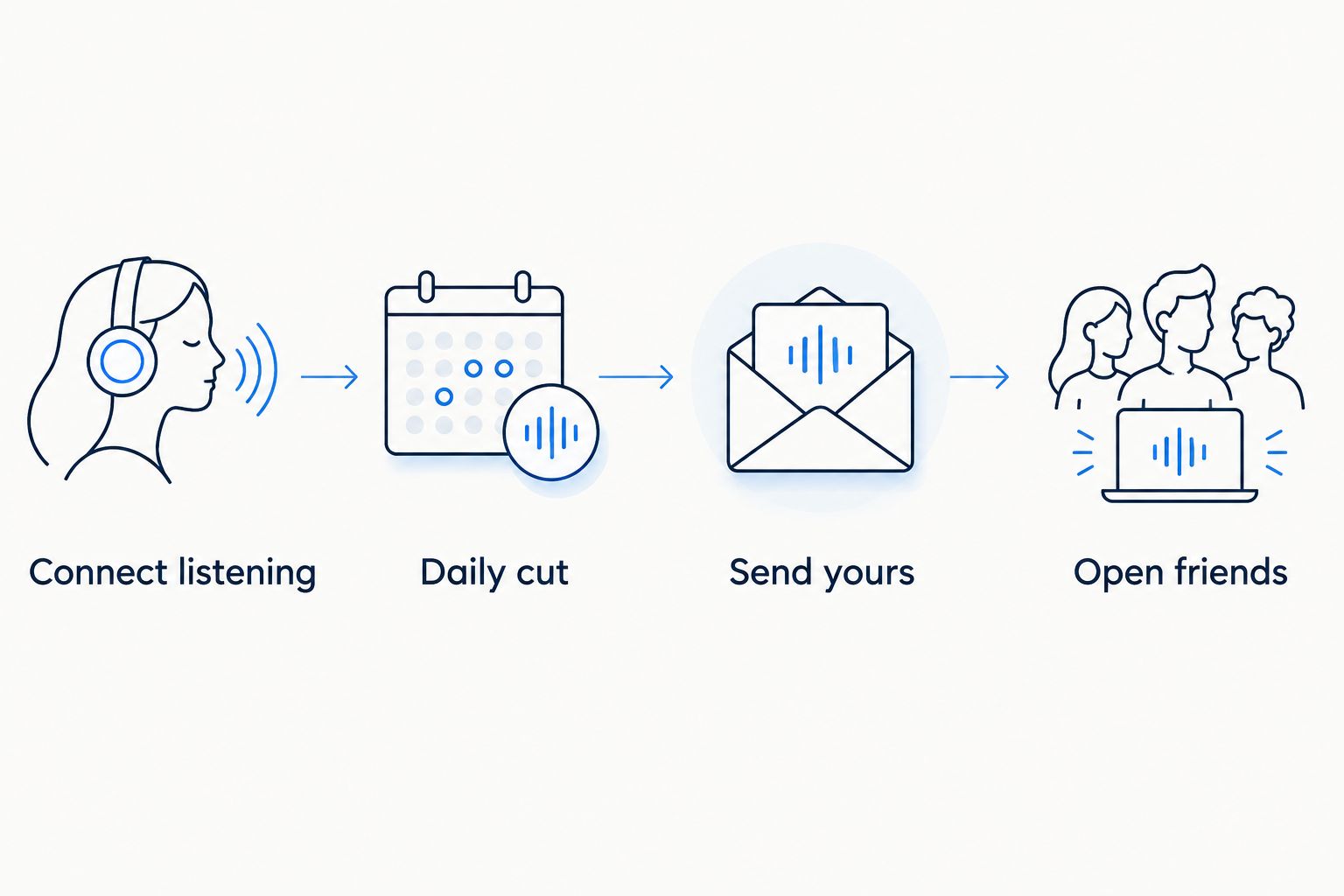
The send-before-reading rule is part of the product, not an optional detail to ignore. Choose it when you want an exchange. Do not choose it if you want to browse without contributing.
Daycut pros:
- Brings the named streaming services into one daily sharing format.
- Assembles the selection automatically rather than asking you to build a playlist.
- Limits each cut to up to 10 tracks.
- Makes skipping explicit: an unsent cut stays invisible.
Daycut cons:
- iOS only for now.
- Spotify requires the Last.fm connection path.
- You must send your cut before opening friends' cuts.
Best for: iPhone groups that want today's listening without moving everyone to the same streaming service.
For this 2026 choice, treat SoundCloud as unsupported. The product site marks it as coming soon. A future connection does not count as current support.
Verdict: Buy — choose this daily-sharing format if the iOS requirement and exchange rule fit your group.
Start your daily music exchange
Connect your listening service, then share a daily cut with friends on iOS.
2. Last.fm: best cross-service option for a listening diary
Last.fm records listening activity as scrobbles and builds a listening history. It also provides music profiles and discovery features. Its core job is keeping a record, not packaging a daily exchange.
Spotify has a Last.fm scrobbling connection. Apple Music listening needs a compatible scrobbling setup rather than that same Spotify connection. Last.fm's support documentation distinguishes these paths; check the path for your device before treating a service as connected.
Last.fm pros:
- Keeps listening history rather than only a daily selection.
- Gives listening activity a profile outside a streaming service.
- Supports discovery based on recorded listening.
- Serves as the Spotify connection used by the first-ranked daily-sharing app.
Last.fm cons:
- Setup differs by service and device.
- A listening record depends on scrobbles reaching the account.
- Profiles and history are a different experience from a small daily friends feed.
Best for: listeners who want a music diary first and social sharing second.
For a 2026 setup, start by checking whether new plays reach your profile. An account alone does not establish that listening is being recorded. Confirm the connection before judging the history.
Verdict: Buy — choose Last.fm for the record of your listening, not for a send-before-reading exchange.
3. Airbuds: best music-sharing app for a friend-activity widget
Airbuds centers friends' listening activity in a widget-based experience. It connects with Spotify and Apple Music. That makes it a relevant comparison when those services divide your group.
The decision is about presentation as much as compatibility. Choose Airbuds when you want friend activity in a widget. Choose a daily-cut format when you want a bounded selection to exchange.
Airbuds pros:
- Supports the Spotify and Apple Music split.
- Puts friends' listening activity in a widget.
- Focuses on music activity rather than asking your group to change streaming services.
Airbuds cons:
- A widget is not a full listening diary.
- Service support does not, by itself, establish support for every device in your group.
- Its activity format is different from a daily selection with an explicit exchange rule.
Best for: friends who want a music-activity widget rather than a daily listening diary.
For this 2026 comparison, Airbuds' own product description and help materials are the reference for its connections and widget behavior. Check the current connection options before inviting someone who uses another service. Do not infer support from Spotify and Apple Music alone.
Verdict: Buy — choose Airbuds when the widget is the feature you want.
4. Spotify: best for shared discovery inside a Spotify group
Spotify provides social features inside its own service. Blend combines participating listeners' tastes in a shared playlist. Friend activity answers a different question: what someone is listening to within Spotify.
These features use Spotify activity. They do not turn a friend's Apple Music listening into Spotify listening history. Spotify's support pages for Blend and Friend Activity describe distinct experiences; do not treat those names as interchangeable.
Spotify pros:
- Keeps shared discovery inside the player your group already uses.
- Offers Blend for combining participating listeners' tastes.
- Avoids another social app when Spotify's native features meet your needs.
Spotify cons:
- Does not provide a cross-service feed of Apple Music listening.
- Blend is a shared playlist, not a daily account of each friend's tracks.
- Friend Activity and Blend serve different purposes.
Best for: friends already on Spotify who want a shared discovery playlist.
Stay with native features if your group is entirely on Spotify and Blend answers the question. Add a sharing layer when the problem is friends outside Spotify, not simply finding more recommendations.
Verdict: Hold — use the existing features first; skip Spotify as the solution to a mixed-service activity feed.
5. Apple Music: best for following Apple Music friends
Apple Music lets users create profiles, follow friends, and share playlists and listening activity. Apple's Music User Guide explains the profile and sharing controls. These are social features inside Apple Music.
They fit an Apple Music group. They do not import a Spotify friend's listening into that profile experience. The boundary is the service, not whether the friend owns an iPhone.
Apple Music pros:
- Keeps friend profiles inside Apple Music.
- Supports sharing playlists and listening activity.
- Provides profile controls for what you share.
Apple Music cons:
- Does not combine Spotify listening with Apple Music activity.
- Profile sharing is not the same as an automatic daily cut.
- Friends using another service need a separate sharing route.
Best for: Apple Music listeners who want to follow friends already using Apple Music.
Verdict: Hold — use profiles for an Apple Music group; skip them as a cross-service feed.
How the ranking works
This 2026 ranking gives daily cross-service sharing the highest priority, then separates the other jobs: listening history, a widget, shared discovery, and native profiles. It does not claim that the first app has the widest device support.
The named source references are the product site for daily-cut rules, Last.fm support for scrobbling, Airbuds product and help materials for its widget and connections, Spotify support for Blend and Friend Activity, and Apple's Music User Guide for profiles. Those sources address different features. A playback-device list is not evidence of cross-service sharing.
Which music-sharing app should you choose?
Choose Daycut for an iPhone group's daily cross-service exchange. Choose Last.fm if the record matters more than the feed. Choose Airbuds if the widget is the point.
If everyone uses Spotify or Apple Music, start with that service's native social features. Add another app only when the missing feature is clear. For your 2026 decision, write down the services and devices in your actual group before comparing feature lists.
FAQ
What's the best app for friends split across Spotify and Apple Music?
Daycut is best for a daily music-sharing feed when everyone participating uses iOS. Apple Music connects to the app, while Spotify listeners connect through a free Last.fm account.
Does cross-platform support mean an app works on Android and iPhone?
Not necessarily. Cross-service support means an app accepts listening from different music services; device support determines where you can use the app. Check both separately.
Is Airbuds better than Last.fm for seeing friends' music?
Airbuds fits a friend-activity widget; Last.fm fits listening history and music profiles. Choose the format you want rather than treating them as the same product.
Can Spotify Friend Activity show Apple Music listening?
No. Spotify Friend Activity concerns activity within Spotify. A mixed-service group needs a separate route to share Apple Music listening.
Do Apple Music profiles show what Spotify friends play?
No. Apple Music profiles share activity and playlists inside Apple Music. Owning the same type of phone does not combine listening across services.
Does a Last.fm account automatically record everything I play?
No. Listening must reach Last.fm through a working scrobbling connection. Confirm that new plays appear before relying on the account as your listening diary.
Should I use Blend or a daily music-sharing app?
Use Blend for a shared Spotify playlist based on participating listeners' tastes. Use a daily music-sharing app when you want to see individual friends' daily listening across supported services.
One last thing
A streaming connection, a scrobbling account, and a visible social post are separate things. Test the entire path: play music, confirm it reaches the connected account, then check what a friend can see. That reveals whether the app solves your problem more clearly than a compatibility badge.