Best for shared editing: Spotify collaborative playlists. Best for Apple Music groups: Apple Music collaborative playlists. Best for daily sharing across services: Daycut, which shares listening rather than editing a shared playlist. This 2026 guide separates apps to create shared playlists with friends from apps that show what friends actually played.
- Spotify collaborative playlists lead apps to create shared playlists with friends when everyone uses Spotify.
- Apple Music collaborative playlists suit groups already listening on Apple Music.
- Spotify Blend combines listening tastes without making everyone choose each track.
- Daycut suits cross-platform daily music sharing, not collaborative playlist editing.
- Airbuds and Last.fm show listening activity; neither replaces a shared playlist editor.
Why this matters
A shared playlist and a listening feed solve different problems. A playlist answers: what should we put in one collection? A feed answers: what did my friends listen to today?
Start with that distinction. Otherwise, you can install a social music app and still have nowhere for everyone to add songs. Or create a playlist that stays empty because nobody wants another thing to maintain.
For a group split across Spotify and Apple Music in 2026, shared visibility is not the same as shared editing. Decide which one you need before asking friends to sign up. If seeing listening activity is the real goal, start with the guide to apps to see what your friends are listening to.
What makes the best shared-playlist app
These criteria determine the ranking. A listening feed does not get credit for editing a playlist.
- Shared editing: Can friends add, remove, and reorder tracks in the same playlist?
- Service fit: Does the workflow match the music services your group already uses?
- Manual control: Do you pick every track, or does the service generate the selection?
- Access rules: Can you control who joins or contributes?
- Daily sharing: Can you see actual listening without maintaining another playlist?
- Clear purpose: Does the app make a lasting collection, a taste mix, or a listening feed?
Shared editing comes first for this query. Daily sharing matters only when your actual goal is keeping up with friends, not building a collection together.
Shared-playlist options at a glance in 2026
The first two options are collaborative playlist editors. The remaining options address adjacent needs and are labelled accordingly.
| Option | Best for | Standout feature | Key limitation |
|---|---|---|---|
| Spotify collaborative playlists | Groups building one Spotify playlist | Contributors add, remove, and reorder tracks | Collaboration stays within Spotify |
| Apple Music collaborative playlists | Groups already using Apple Music | Shared contributions with collaborator controls | Collaboration stays within Apple Music |
| Spotify Blend | An automatically generated taste mix | Combines participants’ listening tastes | Not a substitute for deliberate shared editing |
| Daycut | Daily sharing across music services | One automatic cut of up to 10 tracks | Not a collaborative playlist editor; iOS only |
| Airbuds | Seeing friends’ recent listening | Social listening feed and widget | Not a collaborative playlist editor |
| Last.fm | Listening history across supported services | Scrobbles and listening profiles | Tracking is not shared playlist editing |
1. Spotify collaborative playlists: best for shared editing
Spotify collaborative playlists let contributors add, remove, and reorder tracks in one playlist. You choose the songs. The playlist is a collection your group maintains, not an automatic summary of listening.
This is the default recommendation when your friends already use Spotify. It matches the job directly: build one list together and keep changing it as plans or tastes change.
Use it for a trip, a gathering, or an ongoing collection of recommendations. Agree on the purpose before inviting contributors. A playlist called road trip can still become an argument about whether it means quiet morning songs or loud evening songs.
Spotify collaborative playlists pros:
- Contributors can add their own track choices.
- Contributors can remove and reorder tracks.
- The collection stays inside the service Spotify listeners already use.
Spotify collaborative playlists cons:
- Apple Music listeners do not edit it through Apple Music.
- Shared editing means another contributor can change the collection.
- Someone still needs to select songs; listening alone does not maintain it.
Best for: Friends who use Spotify and want direct control over a shared collection.
Source: Spotify Support’s collaborative-playlist documentation describes contributor editing permissions.
Verdict: Choose Spotify collaborative playlists for actual shared editing. Skip them if your requirement is one editable playlist inside different streaming services.
2. Apple Music collaborative playlists: best for Apple Music groups
Apple Music collaborative playlists let a group contribute to one playlist inside Apple Music. Participants can add, remove, and reorder songs. The collaboration workflow also includes controls for approving collaborators.
Choose this when your group already uses Apple Music. There is no reason to move the editing job into a separate listening tracker when the music service handles it directly.
The important limitation is the service boundary. A friend using Spotify does not become an Apple Music collaborator simply because you send a playlist link. Sharing a link and sharing editing rights are separate actions.
Apple Music collaborative playlists pros:
- Friends contribute directly to the same playlist.
- Participants can change the song order.
- Collaborator approval gives the organizer control over participation.
Apple Music collaborative playlists cons:
- Spotify listeners cannot contribute through Spotify.
- The playlist needs deliberate additions and upkeep.
- Collaboration is not a feed of everything your friends played.
Best for: An Apple Music group making a collection together.
Source: Apple’s iPhone User Guide documents collaboration in Music, including invitations, approval, and shared editing.
Verdict: Choose Apple Music collaborative playlists when Apple Music is your group’s common service. Do not mistake an invitation for cross-platform editing.
3. Spotify Blend: best for an automatic taste mix
Spotify Blend creates a shared playlist from participants’ listening tastes. It supports up to 10 people and updates the mix as listening changes. You do not have to negotiate every addition.
That makes Blend a different answer from collaborative playlists. A collaborative playlist reflects tracks people deliberately add. Blend reflects listening tastes interpreted by Spotify.
Choose Blend when you want a mix, not an editing project. If the group needs to approve every song for a particular event, manual collaboration is the better fit.
Spotify Blend pros:
- Produces a mix without requiring individual track submissions.
- Combines the tastes of multiple participants.
- Updates rather than remaining a fixed collection.
Spotify Blend cons:
- Participants do not control the result like a manually edited playlist.
- Apple Music listening is not a participant’s Spotify listening history.
- A taste mix is not a complete record of what friends played today.
Best for: Spotify listeners who want an automatically generated group mix.
Source: Spotify Support’s Blend documentation describes its taste-based playlist and participant limit.
Verdict: Choose Spotify Blend for automatic mixing. Skip it when exact track selection is the requirement.
4. Daycut: best for daily sharing across services
Daycut is best for friends on different music services who want to see what each other played today. It is not a shared playlist editor. It shares one daily cut of up to 10 tracks, assembled automatically at a shared random moment.
Apple Music and Yandex Music connect directly. Spotify listeners connect through a Last.fm account; the supplied product information describes setup as about 2 minutes. The app is on the App Store for iOS.
The sharing rule matters. Friends’ cuts open after you send yours. If you skip, your cut stays invisible. Automatic assembly removes track selection, but sending still determines whether your cut is shared.
Daily-cut pros:
- Friends can share listening across the supported services.
- The cut is assembled automatically rather than curated track by track.
- A bounded daily selection differs from a continuously changing listening feed.
Daily-cut cons:
- Friends cannot use it to co-edit one playlist.
- It is iOS only.
- Spotify requires the Last.fm connection, and skipping keeps your cut invisible.
Best for: Friends split across services who want daily listening visibility.
Source: The supplied product facts describe the supported connections, daily-cut mechanics, and sharing rule. SoundCloud is marked soon, not supported now.
Verdict: Choose daily cuts for cross-platform sharing. Skip this option if your non-negotiable requirement is collaborative playlist editing.
5. Airbuds: best for recent listening in a social feed
Airbuds is a social listening app built around seeing what friends listen to, including through a widget. Its core job is listening visibility. It is not a workspace for contributors to arrange one shared playlist.
The distinction from a daily cut is the viewing model. Airbuds centers recent listening activity. A daily cut centers a bounded selection from the day. Pick the format you want rather than treating both as playlist tools.
Airbuds pros:
- Centers friends’ listening rather than playlist maintenance.
- Offers a widget for viewing listening activity.
- Fits casual music discovery through people you know.
Airbuds cons:
- Does not replace a collaborative playlist editor.
- Recent activity is not a deliberately organized collection.
- The widget workflow is unnecessary if your only task is adding songs to one list.
Best for: Friends who want a social view of recent listening.
Source: Airbuds’ product description identifies its friend-listening and widget focus.
Verdict: Choose Airbuds for listening activity. Skip it for shared playlist construction.
6. Last.fm: best for a listening history
Last.fm records listening through scrobbles and organizes that activity into a listening profile. It answers a history question: what have you been playing? That is different from deciding what a group should play next.
It also has a practical role in the daily-sharing workflow above. Spotify listeners use a Last.fm connection to supply listening activity. The tracker and the social sharing app perform different jobs.
Last.fm pros:
- Builds a record from listening activity.
- Provides artist and track listening statistics.
- Connects with supported listening sources rather than requiring manual song logging.
Last.fm cons:
- Scrobbling does not create a collaboratively edited playlist.
- Tracking depends on the relevant listening connection.
- A listening profile is not the same format as a bounded daily cut.
Best for: Listeners who want an ongoing record of their music habits.
Source: Last.fm’s scrobbling and Track My Music documentation explains its tracking model and supported connections.
Verdict: Choose Last.fm for listening history. Skip it as the main tool for editing a playlist with friends.
How to choose and start
Do not begin by asking everyone to install another app. Begin with the collection you want to make. Then choose the workflow that actually produces it.
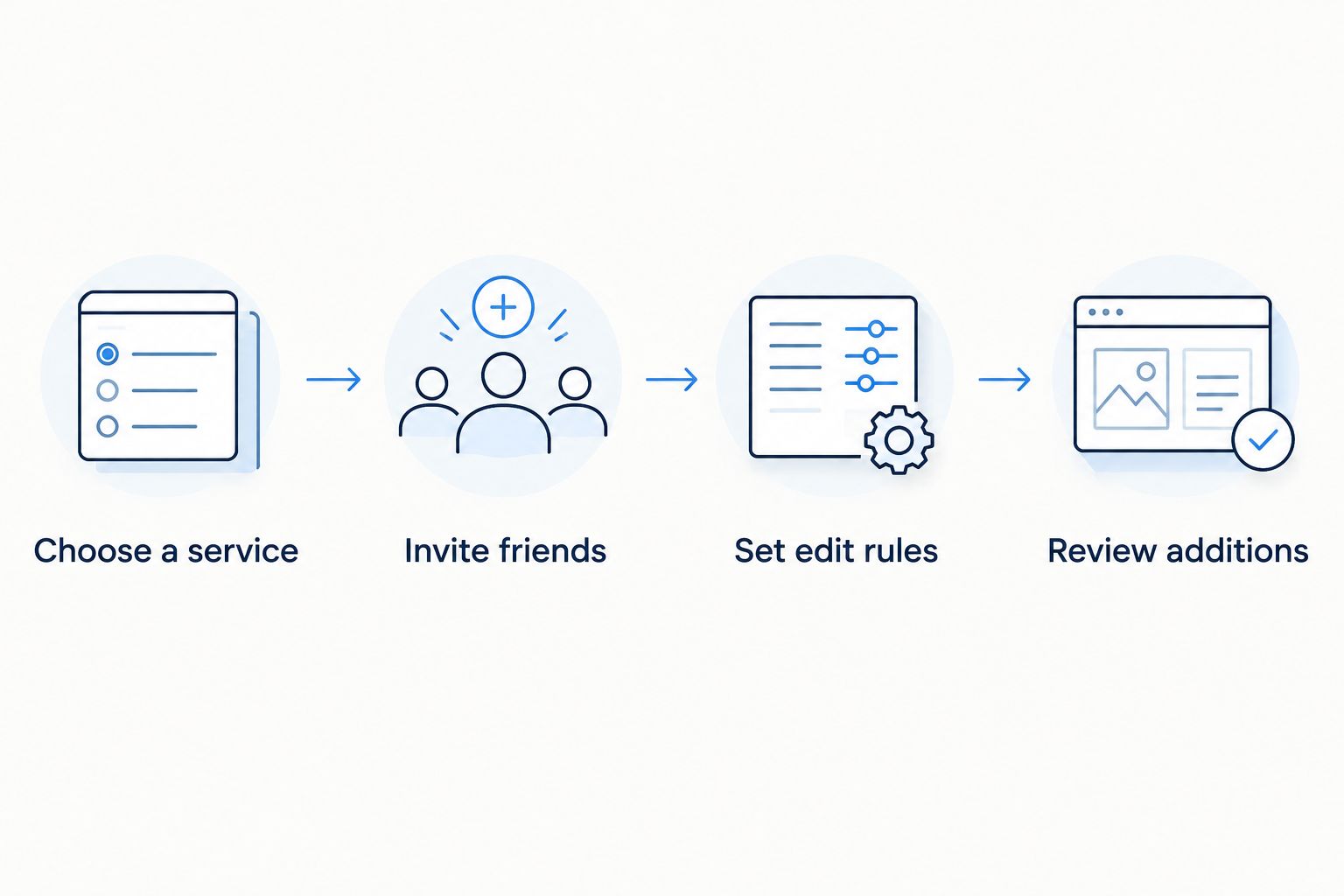
- Choose a service. For shared editing, establish whether the group uses Spotify or Apple Music.
- Invite friends. Use the chosen service’s collaboration workflow, not just an ordinary playlist-sharing link.
- Set edit rules. Agree on the playlist’s purpose and whether contributors should remove other people’s additions.
- Review additions. Check whether the collection still serves its original purpose. If nobody adds songs, reconsider whether listening visibility was the real need.
For cross-platform daily sharing instead, the decision is different. Connect your supported listening service, understand the send-to-see rule, and use the daily cut rather than expecting a playlist editor.
Start sharing your daily listening
iOS daily cuts across Apple Music, Yandex Music, and Spotify through Last.fm. Not a playlist editor.
How this 2026 ranking works
The ranking puts shared editing first because that is the stated job. Spotify collaborative playlists and Apple Music collaborative playlists satisfy it directly. Spotify Blend handles automatic mixing. The remaining options handle listening visibility or history.
This is a workflow comparison, not a hands-on performance test. The source notes identify the documentation behind the mechanics. No ratings, installation counts, or invented test results determine the order.
Service fit decides between the first two options. Editing control separates collaborative playlists from Blend. Daily sharing separates a listening feed from a collection your friends maintain.
Which option should you choose in 2026?
Choose Spotify collaborative playlists by default if everyone uses Spotify. Choose Apple Music collaborative playlists if everyone uses Apple Music. Those are the direct answers to creating a playlist together.
Choose Spotify Blend when you want an automatic taste mix. Choose a daily-sharing app when your friends use different services and the real goal is seeing their listening. Choose Last.fm when you want history rather than a shared collection.
Do not ask a feed to be an editor. Do not ask an editor to show what everyone actually played.
FAQ
What's the best app to create a shared playlist with friends?
Spotify collaborative playlists are the default for groups already using Spotify. Apple Music collaborative playlists are the direct alternative for groups using Apple Music. Choose the service your contributors use.
Can Spotify and Apple Music friends edit the same playlist?
Not through the native collaboration tools described here. Spotify collaboration happens inside Spotify, and Apple Music collaboration happens inside Apple Music. Sharing a link does not create editing access in another service.
Is Spotify Blend the same as a collaborative playlist?
No. Spotify Blend generates a playlist from participants’ listening tastes, while a collaborative playlist lets contributors deliberately add, remove, and reorder songs. Blend supports up to 10 people.
Can Daycut create a shared playlist with friends?
No. Daycut shares an automatically assembled daily cut of up to 10 tracks rather than a collaboratively edited playlist. It suits friends who want to see listening across supported music services.
Is Airbuds better than a daily-cut app?
Airbuds fits recent listening activity and a widget; a daily-cut app fits a bounded selection from the day. Neither format replaces collaborative playlist editing. Choose based on how you want to see friends’ listening.
Do Spotify listeners need Last.fm for daily cuts?
Yes, for the daily-cut app described here. Spotify listeners connect through a Last.fm account, while Apple Music and Yandex Music connect directly. The supplied product information puts setup at about 2 minutes.
Does Last.fm automatically build a playlist my friends can edit?
No. Last.fm’s scrobbling records listening and builds a listening profile. Use a collaborative playlist tool when friends need to choose and arrange songs together.
What's the simplest shared-playlist choice in 2026?
Use the collaboration feature in the music service your group already uses. Choose Spotify collaborative playlists for a Spotify group or Apple Music collaborative playlists for an Apple Music group. A separate listening feed solves a different problem.
One last thing
A collaborative playlist records what people chose to add. It does not prove they listened to those songs. If you want to know what friends actually played, choose a listening-based workflow. That single distinction rules out the wrong app before setup starts.