
Best overall for friends on different music services: Daycut. Best for a listening widget: Airbuds. Best for listening history: Last.fm. These are the strongest starting points among apps to discover new music through friends in 2026; Spotify Blend and Apple Music profiles suit groups that already share a service.
- Daycut leads apps to discover new music through friends for daily, cross-service music sharing on iOS.
- Airbuds suits friends who want listening activity in a home-screen widget.
- Last.fm suits listeners who want a lasting record of friends’ music habits.
- Spotify Blend combines tastes into a playlist; Apple Music profiles keep discovery inside Apple Music.
Why this matters
A recommendation feed and a friend’s listening history answer different questions. One predicts what you will like. The other shows what someone you know actually played.
That difference matters when you want a reason to try an unfamiliar artist. A friend’s repeated listening gives you context that a suggested track alone does not. You can ask about the album, save the song, or leave it alone.
The practical obstacle is the service split. A Spotify feature does not become an Apple Music social feed just because both people can search for the same song. Choose the sharing method before asking everyone to join.
What makes the best apps for friend-led music discovery?
For this 2026 comparison, the deciding criteria are concrete:
- Friend activity: Does the app show actual listening, or build a playlist from combined tastes?
- Service fit: Can your group keep its existing music services?
- Sharing effort: Does listening create the shared content, or must someone maintain a playlist?
- Time frame: Are you looking at today’s listening, a continuing feed, or a longer history?
- Access rules: What must you connect, share, or send before you can see friends?
- Device fit: Does the app work on the phone you use? A suitable feature on the wrong operating system is not a solution.
Pick the format your friends will actually use. A detailed archive is unnecessary if you only want a short daily catch-up. A daily selection is insufficient if you want to inspect listening patterns over time.
The best options at a glance
| App or feature | Best for | Standout feature | Key limitation |
|---|---|---|---|
| Daycut | Daily discovery across music services | An automatic daily cut of up to 10 tracks | iOS only; Spotify connects through Last.fm |
| Airbuds | Glancing at friends’ listening | Home-screen listening widget | A widget is not a jointly curated playlist |
| Last.fm | Exploring listening history | Scrobbled tracks and listener profiles | Recording depends on a working scrobbling connection |
| Spotify Blend | Turning shared tastes into a playlist | A playlist shaped by participants’ listening | Participants need Spotify accounts |
| Apple Music profiles | Finding music within an Apple Music friend group | Shared playlists and listening on profiles | Not a cross-service friend feed |
1. Daycut: best for daily discovery across music services
This iOS music-sharing app assembles 1 daily cut of up to 10 tracks automatically at a shared random moment. It connects Apple Music and Yandex Music; Spotify listeners connect through a Last.fm account.
The result is a short account of what friends played today. Your group does not need to agree on one streaming service. That is the clearest reason to choose this option over a feature built inside a single music app.
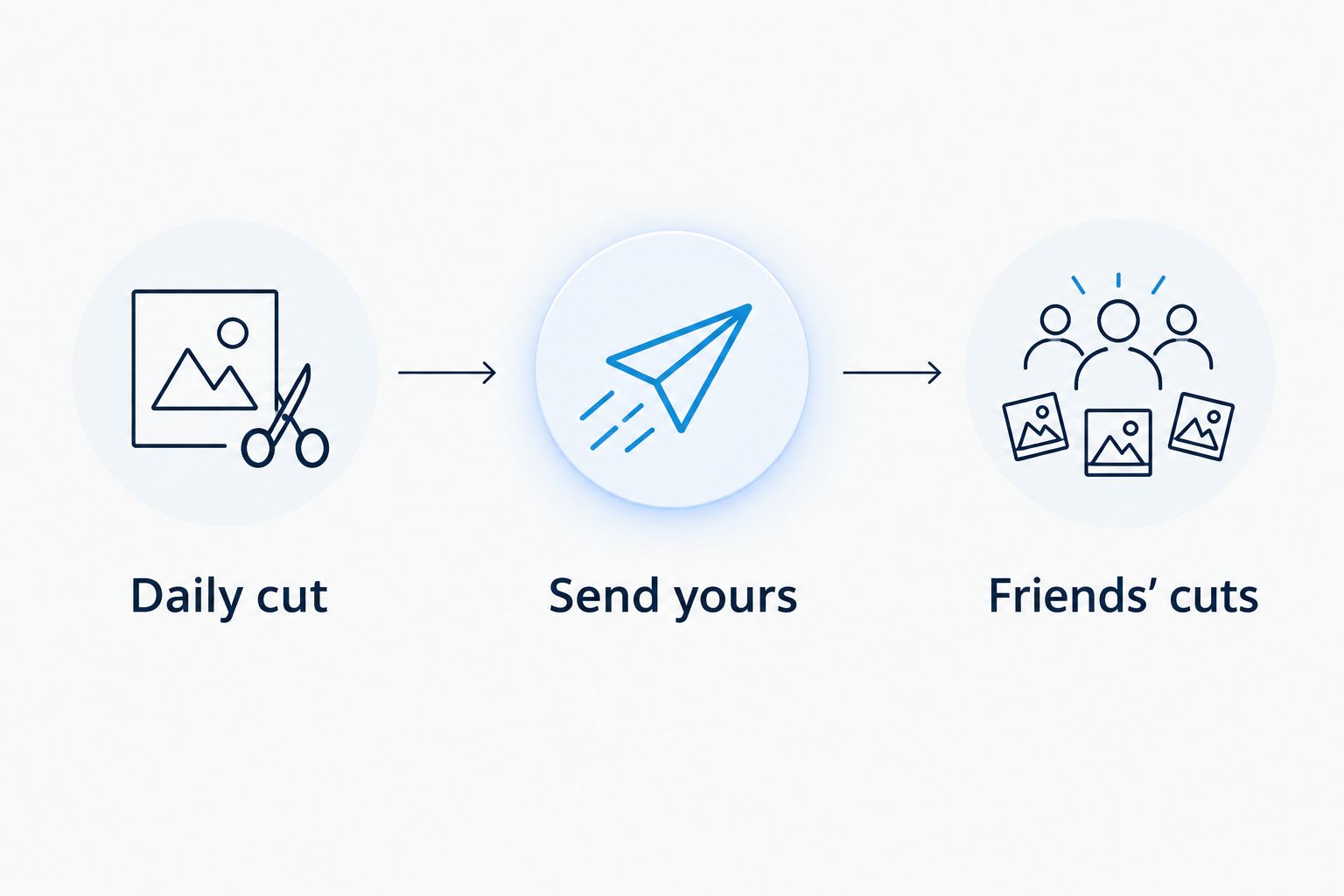
What the daily exchange looks like
- Daily cut: The app assembles your selection automatically.
- Send yours: Sending your cut opens access to friends’ cuts.
- Friends’ cuts: You see the daily selections your friends shared.
Skipping leaves your cut invisible. The exchange is not an unrestricted window into everyone’s listening: sharing your own cut is part of the rule.
Pros:
- Friends can keep Spotify, Apple Music, or Yandex Music.
- Automatic assembly removes the need to choose every shared track manually.
- The track limit keeps each person’s daily contribution bounded.
- The send-to-open rule makes the exchange reciprocal.
Cons:
- iOS only. It does not solve the problem for a friend who needs an Android app.
- Spotify requires the additional Last.fm connection.
- A daily cut is not a complete listening archive or a live activity feed.
The official site describes the Spotify connection as taking about 2 minutes. Treat that as a setup estimate, not a reason to skip checking that the connection works. SoundCloud is marked as coming soon, not supported now.
Best for: An iPhone friend group split across Spotify, Apple Music, and Yandex Music.
Verdict: Choose Daycut for daily music discovery across those services. Skip it if Android access or a full listening archive is essential.
Start sharing your daily listening
Open the site for the App Store link and service connection details.
2. Airbuds: best for a home-screen listening widget
Airbuds centers friend listening around a widget. Its official app description presents it as a way to see what friends listen to and react to their activity.
That makes it a different habit from opening a daily digest. You put friend activity on the home screen, then use what appears there as a starting point for discovery. The widget is the reason to choose it.
Pros:
- Friend listening is the main subject, not a secondary playlist feature.
- A home-screen widget puts activity somewhere you already look.
- Reactions give you a way to respond to a friend’s listening.
Cons:
- Seeing activity does not itself create a shared playlist.
- The widget format is not a substitute for a detailed listening archive.
- You still need friends to participate; an empty social group gives you no friend-led discovery.
Before committing your group, check Airbuds’ current connection options against everyone’s music service. A listening widget and cross-service support are separate questions. Do not assume that one proves the other.
Best for: Friends who want music activity visible without making a daily digest their main routine.
Verdict: Choose Airbuds if the widget is the feature you want. Skip it as a substitute for a group playlist.
3. Last.fm: best for exploring friends’ listening history
Last.fm records listening through scrobbling: a connected service or app sends played tracks to your account. Profiles organize that record into listening history and music charts.
For friend-led discovery, the useful part is persistence. You can explore what someone returns to, rather than treating a single appearance in a feed as a recommendation. An artist that keeps appearing gives you a different starting point from one isolated song.
Pros:
- Recorded listening creates an archive you can revisit.
- Artist and track charts make repeated listening easier to inspect.
- Profiles let you explore another listener’s habits beyond a shared playlist.
- Scrobbling separates the listening record from the act of writing a post.
Cons:
- A missing or broken scrobbling connection leaves gaps in the record.
- History can be more information than you want for a quick catch-up.
- Your friends need usable profiles and recorded listening for this approach to work.
Last.fm’s official Help material explains scrobbling and service connections. Use those instructions when setting up your account. A profile alone is not evidence that your current music app is sending tracks correctly.
For a 2026 shortlist, Last.fm belongs in the history slot, not the short-daily-exchange slot. Its value is the record you can inspect over time.
Best for: Listeners who want to examine friends’ recurring artists, songs, and listening patterns.
Verdict: Choose Last.fm for listening history. Skip it if you only want a brief daily selection.
4. Spotify Blend: best for a playlist shaped by shared tastes
Spotify Blend creates a shared playlist using participants’ listening tastes. Spotify’s official Support material describes the feature as a blend of the music its members listen to.
This answers a different discovery question: what should this group listen to? You get a playlist rather than a straightforward account of each friend’s day. That distinction is useful when you want something to play immediately.
Pros:
- Combined tastes become a playable playlist.
- Friends do not have to select every contribution manually.
- It stays inside Spotify for a group already using Spotify.
Cons:
- Participants need Spotify accounts.
- A blended playlist is not a chronological friend-activity log.
- It does not provide an Apple Music or Yandex Music listening feed.
Choose Blend when shared listening is the goal. Do not choose it merely because the word shared sounds like the social feed you wanted. A song in a combined playlist and a song a friend played today are different signals.
You can still ask a friend which part of the playlist reflects their taste. The playlist supplies material for that conversation; it does not replace the conversation.
Best for: Spotify users who want music selected from the group’s combined tastes.
Verdict: Choose Spotify Blend for a shared playlist. Skip it for a cross-service record of friends’ daily listening.
5. Apple Music profiles: best for discovery inside Apple Music
Apple Music profiles let listeners follow friends and see music and playlists those friends share. Apple’s official user guides explain profile setup, following friends, and controlling shared listening.
For an Apple Music-only group, this is the first feature to check in 2026. You can explore a friend’s profile without making a separate social app the starting point.
Pros:
- Friend discovery stays inside Apple Music.
- Shared playlists provide a deliberate selection from a friend.
- Profile settings give listeners control over what they share.
Cons:
- It is not a combined feed of Spotify, Apple Music, and Yandex Music listening.
- What you see depends on your friend’s sharing choices.
- A shared profile does not follow the same reciprocal daily-cut rule.
Start by checking whether your friends have profiles and share anything useful to you. A service-native feature is the simpler choice only when the group actually uses that service and participates in its social features.
Best for: Friends who all use Apple Music and want to explore shared listening and playlists there.
Verdict: Choose Apple Music profiles for an Apple Music-only group. Skip them as a cross-service solution.
How we ranked
The order follows the criteria above: actual friend listening, service fit, sharing effort, time frame, access rules, and device fit. It is a fit-based ranking, not a claim that every reader should install the first app.
The product facts come from named product documentation: daycut.app’s stated mechanics, Airbuds’ official app description, Last.fm Help on scrobbling, Spotify Support on Blend, and Apple’s Apple Music user guides on friend profiles. This 2026 comparison distinguishes daily selections, widget activity, recorded history, and combined playlists.
The decisive question is what you want to see. Today’s cut, ongoing activity, historical charts, and a shared playlist are not interchangeable outputs.
Which music-discovery app should you choose?
Start with your group, not the longest feature list. Write down the music service and phone platform each participating friend uses. Then choose the format.
- Daily selections across supported services: Choose the daily-cut approach if the participating group uses iPhones.
- Home-screen activity: Choose Airbuds when the widget is the point.
- Listening history: Choose Last.fm when you want to inspect repeated listening.
- A combined Spotify playlist: Choose Spotify Blend.
- Apple Music profiles and playlists: Use Apple Music’s own friend features when the group stays there.
For the undecided reader in 2026, the default is the daily-cut option if cross-service sharing is the problem. If everyone already uses the same service, check that service’s friend feature before adding another app.
FAQ
What are the best apps to discover new music through friends?
Daycut is the best fit here for daily discovery among iPhone friends using different supported music services. Airbuds suits widget-based activity, Last.fm suits listening history, and Spotify Blend suits a combined playlist.
Can Spotify and Apple Music friends share their listening together?
Yes. The daily-cut app connects Apple Music directly and Spotify through a Last.fm account, letting friends share daily selections without switching their listening service.
Is Airbuds better than Last.fm for seeing friends’ music?
Airbuds is the better fit for a home-screen listening widget; Last.fm is the better fit for recorded listening history. Choose the time frame and format you want rather than treating them as equivalent feeds.
Does Spotify Blend show what a friend played today?
Spotify Blend is a combined playlist, not a daily listening log. Its purpose is to mix participants’ tastes into music the group can play.
Do Apple Music profiles show friends who use Spotify?
No. Apple Music profiles are an Apple Music social feature, not a cross-service listening feed.
Can I see friends’ daily cuts without sending mine?
No. Friends’ cuts open after you send yours, and skipping leaves your own cut invisible.
Is SoundCloud supported by the daily-cut app?
No. SoundCloud is marked as coming soon; the stated connections are Apple Music, Yandex Music, and Spotify through Last.fm.
One last thing
A song someone played is not automatically a song they recommend. Listening activity gives you a starting point, not a review. Ask your friend about the unfamiliar track before treating it as their favorite.
That small distinction makes friend-led discovery more useful. The app supplies the song. Your friend supplies the reason.