Best for a dated listening record: Last.fm. Best for a shared daily ritual: Daycut. Best for a friend-activity widget: Airbuds. The best music apps for tracking listening streaks depend on whether you want consecutive listening days, a listening history, or something to share each day.
- Last.fm is the best starting point for checking listening history, not a substitute for a defined streak counter.
- Daycut is best for music listeners who want to share a daily cut across different streaming services.
- Airbuds suits friend activity through widgets; Spotify and Apple Music suit sharing within their own services.
- Choose music apps for tracking listening streaks by their daily records, connection requirements, and sharing rules.
Why this matters
A daily feed is not a listening streak. A streak measures consecutive days that meet a rule. A listening log records plays. A social feed shows friends what you heard. Those are different jobs.
For this 2026 guide, the ranking separates them. Last.fm belongs near the top for recorded listening. A daily-sharing app belongs near the top for a shared routine. Neither label proves that an app displays a consecutive-day counter.
Start with the result you need. If you want to know whether you listened yesterday, choose a dated record. If you want to see what a friend heard yesterday, choose a social feed. If you specifically want a visible streak number, check that feature before installing.
What makes the best listening-tracking app
- Dated records: You need listening attached to a day, not just a lifetime total.
- Clear completion rules: Playing music, recording a play, and sharing a daily selection are different actions.
- Service compatibility: A tracker is useful only if it receives listening from your actual music service.
- Friend visibility: Private listening history does not automatically become a shared feed.
- Manageable setup: An extra account or connection is a real trade-off, even when the resulting record is useful.
- An appropriate format: Choose a history, widget, daily selection, or live activity view deliberately.
Music-tracking apps at a glance
| App | Best for | Standout feature | Key limitation |
|---|---|---|---|
| Daycut | A shared daily music ritual | One automatic daily cut across supported music services | iOS only; Spotify requires Last.fm |
| Last.fm | A dated listening archive | Scrobbles that build a listening history | Recording depends on a working scrobbling connection |
| Airbuds | Friend activity through widgets | A social listening widget | A widget is not a full listening audit |
| Spotify | Checking friends inside Spotify | Friend listening activity | Does not combine friends’ Apple Music or Yandex Music listening |
| Apple Music | Following Apple Music listeners | Profiles with shared listening and playlists | Does not combine friends’ Spotify listening |
This is a use-case ranking, not a claim that every app has a streak counter. In 2026, the right choice still starts with what you want recorded and who needs to see it.
1. Daycut: best for a shared daily music ritual
Daycut is a music-sharing app for friends who use different services. It assembles one daily cut of up to 10 tracks automatically at a shared random moment. Apple Music and Yandex Music connect directly; Spotify listeners connect through a free Last.fm account.
The sharing rule matters. Friends’ cuts open after you send yours. Skip, and your cut stays invisible. That gives you a daily participation rule, rather than an always-open view of everyone’s listening.
Daycut is best for music listeners who want to share a daily cut across different streaming services. It is not a substitute for an exhaustive listening archive or evidence of a consecutive-day streak counter.
Daycut pros:
- Friends can share across Spotify, Apple Music, and Yandex Music.
- The daily selection is assembled automatically.
- A cut has a defined limit rather than an unlimited play history.
- The send-before-view rule makes participation explicit.
Daycut cons:
- The app is iOS only.
- Spotify requires an additional Last.fm connection.
- Skipping leaves your cut invisible; a cut also does not contain every play.
The official site describes the Spotify connection as taking about 2 minutes. Install through the App Store link on the site, then connect the service you actually use. SoundCloud is marked as coming soon, not supported now.
Best for: An iPhone friend group split across streaming services.
Verdict: Buy into the daily-sharing format; skip it for a complete listening ledger.
2. Last.fm: best for a dated listening archive
Last.fm records listening through scrobbles. A scrobble is a record of a track you played, sent through a supported connection. The resulting listening history is the useful part when you want to inspect your habits over time.
Choose Last.fm when your question is factual: what did you listen to, and when? Its library gives you a record to inspect. A daily selection answers a different question and leaves out plays by design.
For this 2026 comparison, Last.fm’s own Help material on scrobbling is the reference for that recording model. A recorded play is evidence of recorded listening, not proof that every listening session reached the account. Keep that distinction when checking consecutive days.
Last.fm pros:
- Builds a dated record of individual tracks.
- Keeps listening history separate from a single streaming-service profile.
- Offers artist and track listening summaries.
- Provides the connection route used by Spotify listeners joining the daily-sharing app above.
Last.fm cons:
- A disconnected or incorrectly configured scrobbler leaves gaps.
- Setup differs by listening source.
- A historical library is not the same format as a compact daily friend feed.
Check a recent session before trusting the archive. Look for the tracks you just played and their timestamps. Do not treat an empty day as a broken listening streak until you have checked the connection.
Best for: Listeners who want a record they can inspect by date.
Verdict: Buy into Last.fm for history; do not assume it supplies your preferred streak rule.
3. Airbuds: best for friend activity through widgets
Airbuds centers on seeing friends’ listening through a widget and reacting to it. That makes it a social-awareness option rather than the first choice for auditing a complete listening history.
The relevant source is Airbuds’ official product description, which presents the app as a friends’ listening widget. Choose it for that format. A visible track from a friend is useful, but it does not by itself establish how many consecutive days that friend listened.
Airbuds pros:
- Puts friend listening activity in a widget format.
- Includes reactions as part of the social experience.
- Focuses on what friends hear rather than maintaining a playlist together.
Airbuds cons:
- Widget activity is not an exhaustive record of every play.
- Reactions measure interaction, not consecutive listening days.
- You still need to check support for your group’s music services and devices.
The choice between Airbuds and a daily-cut format is about what you want to open. A widget suits checking activity. A shared daily selection suits checking a bounded recap. Neither format should be described as a verified streak tracker just because you use it daily.
For a 2026 shortlist, put Airbuds in the social-widget slot. Keep the archive slot separate, especially if missing a recorded day would matter to you.
Best for: Friends who want listening activity in a widget.
Verdict: Buy into Airbuds for the widget; skip it as your sole listening audit.
4. Spotify: best for checking friends inside Spotify
Spotify’s friend listening activity is the built-in option for seeing activity from other Spotify listeners. It keeps that task inside the service you already use. Spotify Support’s Listening Activity documentation is the named reference for its sharing mechanics.
Its scope is the limitation. A friend listening in Apple Music or Yandex Music does not become part of Spotify’s activity view just because you follow that person elsewhere.
Spotify pros:
- Keeps friend activity within Spotify.
- Shows listening activity without requiring a separate social-music app for that task.
- Fits groups whose relevant listening happens in Spotify.
Spotify cons:
- Does not combine listening from other streaming services.
- Activity visibility depends on sharing settings and the supported interface.
- A current activity view does not establish a consecutive-day history.
Use Spotify when the actual question is whether a Spotify friend is listening. Do not stretch that into a daily archive. Seeing a track now tells you about the displayed activity, not whether the person met a listening rule yesterday.
Before adding another app, check what your group needs. If everyone wants the existing activity view, keep it simple. If the group is split across services, Spotify alone does not solve the sharing problem.
Best for: Spotify users checking other Spotify users.
Verdict: Hold onto Spotify for same-service activity; skip it for cross-service tracking.
5. Apple Music: best for following Apple Music listeners
Apple Music profiles let listeners share playlists and listening with followers. Apple Support’s guidance on seeing what friends are listening to is the reference for this profile-based feature.
This is a reasonable first stop when your friends already use Apple Music. You can use the service’s existing social features rather than introducing a separate app solely to see shared listening.
Apple Music pros:
- Keeps shared listening inside Apple Music.
- Combines profile-based following with shared playlists.
- Suits friends whose listening already happens in the same service.
Apple Music cons:
- Does not combine Spotify or Yandex Music listening into those profiles.
- Shared profile activity is not a complete daily listening ledger.
- Following a listener does not establish a consecutive-day streak.
The distinction matters for Apple Music users missing a broader friend feed. A profile can show shared listening within Apple Music. It cannot answer what a Spotify friend played through an unrelated service.
For 2026, choose the built-in profile when the service boundary is acceptable. Choose a cross-service sharing app when that boundary is the problem. Choose a dated tracker when the question is about your own listening record.
Best for: Apple Music listeners following other Apple Music listeners.
Verdict: Hold onto Apple Music profiles for same-service sharing; skip them for a mixed-service group.
How to check a listening streak without confusing the rules
Define the rule before choosing the app. Otherwise, you can complete a sharing action while failing the listening rule you meant to measure.
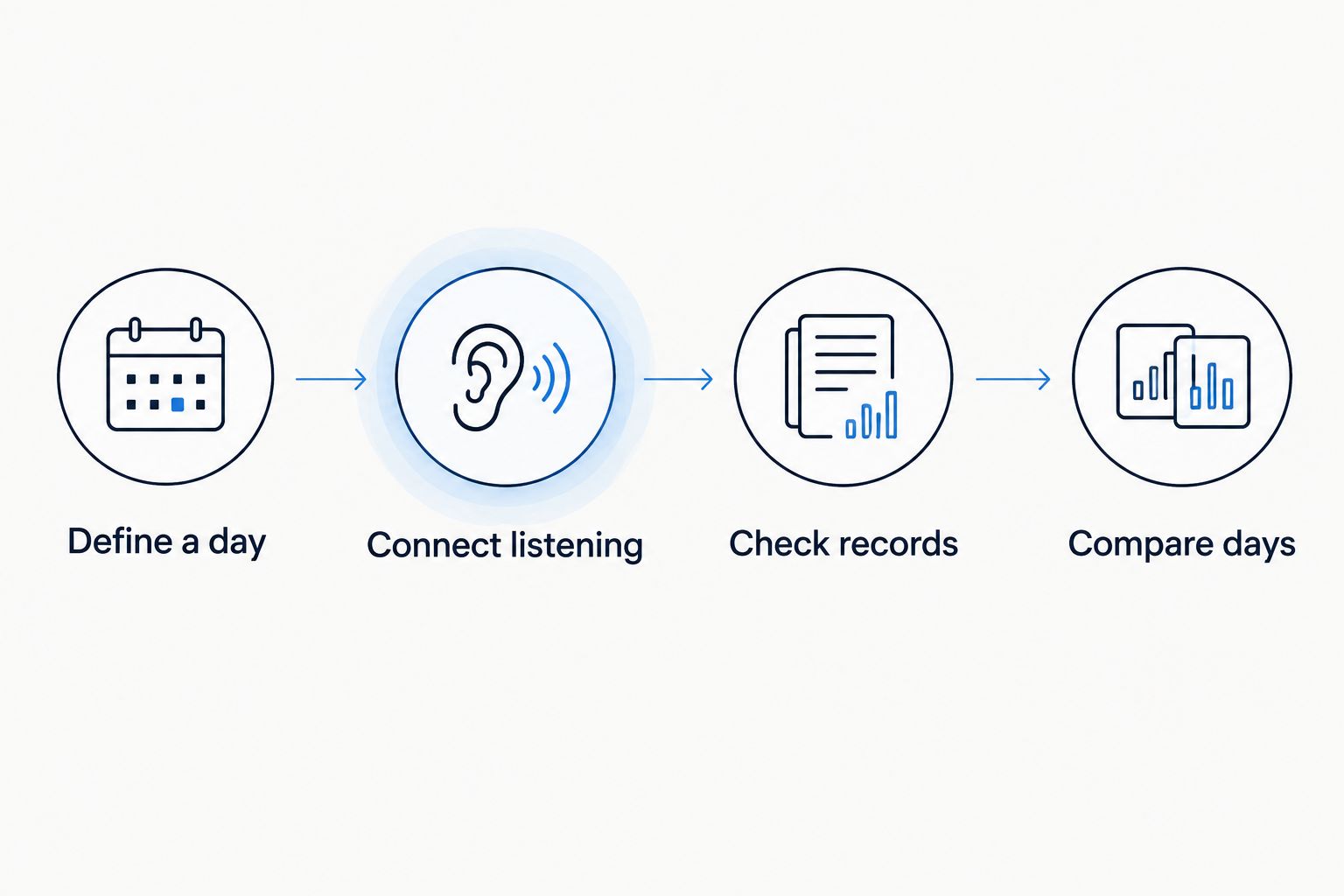
Use this sequence:
- Define a day: Decide which calendar day and time zone your record uses.
- Connect listening: Link the service or scrobbler that records your actual plays.
- Check records: Confirm that a listening session appears with the expected date.
- Compare days: Inspect consecutive dates against your chosen listening rule.
A sharing streak would need a different rule: whether you sent something each day. A reaction streak would measure reactions. Neither proves that a listening record is complete.
A daily cut also has a different boundary from a calendar-day archive. Its selection happens at a shared random moment. Do not expect a bounded selection to reproduce every track played during the day.
How we ranked these music apps
This ranking matches each app to a distinct job: daily sharing, dated history, widget activity, Spotify activity, or Apple Music profiles. It does not rank unverified streak counters or claim hands-on testing.
The source scope is specific. The brand’s official product facts establish the daily-cut mechanics. Last.fm Help explains scrobbling. Airbuds’ official description establishes the widget format. Spotify Support and Apple Support describe their respective social features.
The decisive criteria are record type, service boundaries, setup, and friend visibility. A feature that answers the wrong question does not win merely because it is convenient.
Which music-tracking app should you choose?
Choose Last.fm by default if tracking means examining dated listening. Confirm the connection, then use the recorded history rather than a social snapshot.
Choose Daycut if tracking means keeping up with what friends heard today across services. Its music-sharing format gives you a daily selection, not a complete archive.
Choose Airbuds for the widget. Keep Spotify or Apple Music when their same-service social features already match your group.
If a visible consecutive-day counter is non-negotiable, check that exact feature before committing. Daily use, daily sharing, and a displayed listening streak are not interchangeable.
Start a daily music cut
Open the site for the App Store link. Connect your music service and share a daily cut with friends.
FAQ
What's the best app for checking consecutive listening days?
Last.fm is the best starting point here for inspecting dated listening records. Check that scrobbling works before interpreting missing dates; a listening archive is not necessarily a dedicated streak counter.
Does Daycut track listening streaks?
Daycut shares a daily cut; its stated product facts do not establish a consecutive-day streak counter. It automatically assembles up to 10 tracks and opens friends’ cuts after you send yours.
Is Airbuds better than Last.fm for tracking listening?
Airbuds fits friend activity through widgets; Last.fm fits recorded listening history. Choose the format that answers your question rather than treating both as the same kind of tracker.
Can Spotify listeners share daily cuts with Apple Music friends?
Yes. Spotify listeners connect through a free Last.fm account, while Apple Music connects directly to the daily-cut app. Friends can then see each other’s shared listening across those services.
Does playing music every day guarantee a recorded streak?
No. A listening tracker needs to receive the plays, and the dates must meet your chosen rule. Check the connection before treating a gap as a day without listening.
Can Apple Music profiles show a friend's Spotify listening?
No. Apple Music profiles show shared activity within Apple Music, not a combined history from Spotify. Use a cross-service sharing format when friends listen in different services.
Can I use a daily cut as a complete listening diary?
No. A daily cut contains up to 10 tracks, so it is a selection rather than a record of every play. Use a dated listening archive when completeness is the goal.
One last thing
A blank day can mean a recording gap, not silence. Before you abandon a listening streak in 2026, check whether the tracker received the session.
That is the practical distinction to keep: listening happened, listening was recorded, and listening was shared are separate events. Pick the app for the event you actually care about.