Best overall for a bounded friend feed: Daycut. Best for choosing who follows you: Apple Music. Best for pausing activity sharing: Spotify. Best for a listening log: Last.fm. Best for a social music widget: Airbuds. Daycut is the best fit for iOS listeners who want friends to see a daily selection across music services rather than follow a live activity feed.
- Daycut leads this music social apps ranked by privacy guide for a daily cut of up to 10 tracks shared with friends.
- Apple Music is the pick when approving followers matters more than sharing across services.
- Spotify offers a Private Session; Last.fm suits a listening log, not a bounded daily selection.
- This ranks what friends can see, not what each company collects behind the scenes.
Why this matters
A music social app can show a selected slice of your day, your current activity or a record of what you played. Those are different choices even when each app calls the result sharing. If your friends are split across services, start with the apps for seeing what friends are listening to. Then decide how much of your own listening you want visible.
This 2026 ranking covers sharing exposure: the audience, the amount of listening shown, how often it appears and whether it remains available as history. It does not rank data security, advertising practices, account permissions or privacy-policy terms. A short feed is not proof that an app collects less data.
What makes the best music social app for privacy
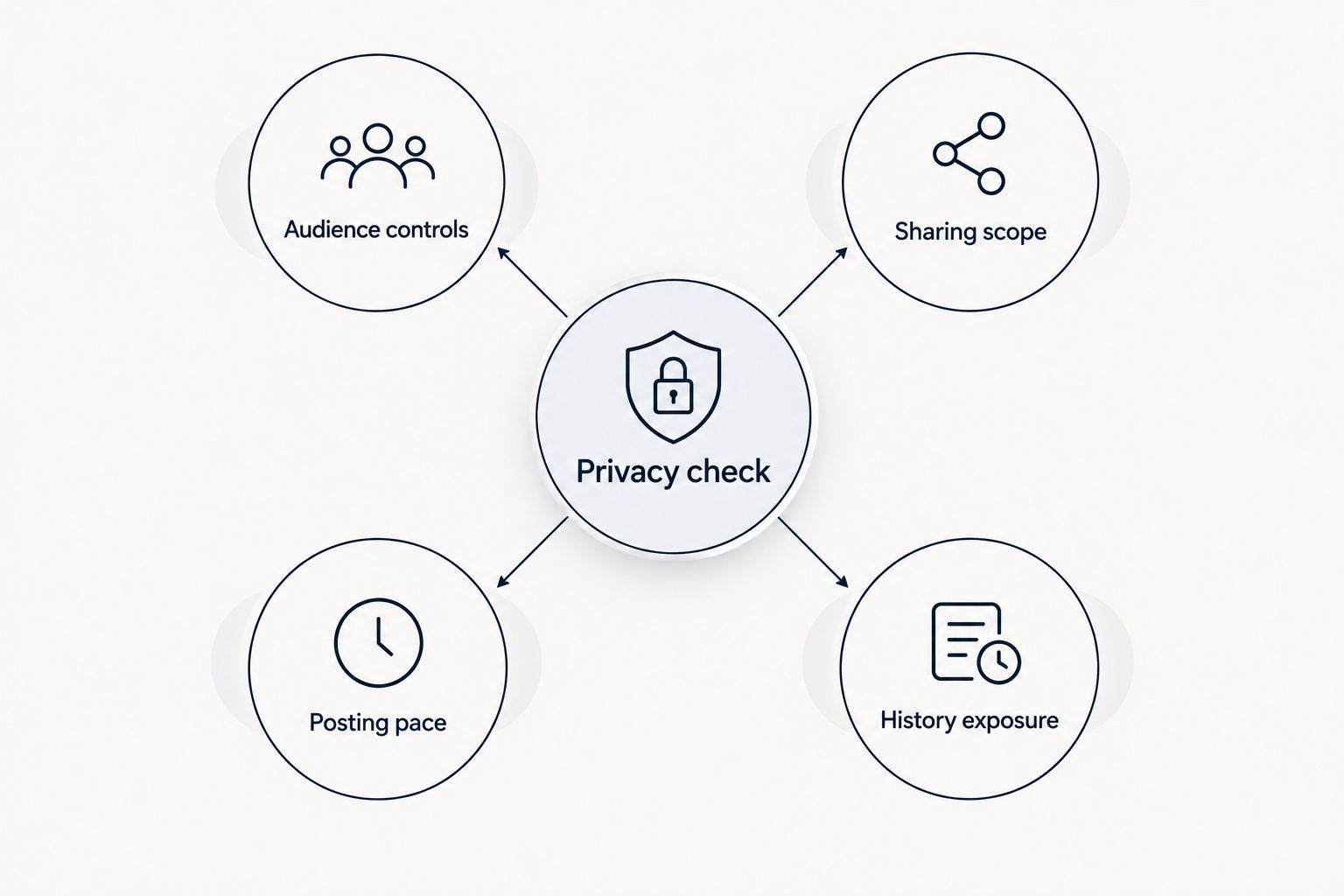
Use these checks before picking an app. The right answer depends on what you want to keep from your friends, not just whether an app has a privacy setting.
- Audience controls: Can you decide who follows your profile or sees your activity? An approved audience and a smaller post are separate protections.
- Sharing scope: Does the app show a daily selection, current activity or a listening log? Check what a friend can see without opening your settings.
- Posting pace: Does listening appear as it happens, or as a daily cut? A delayed summary changes what someone can infer about what you are playing now.
- History exposure: Can someone browse past listening? A feed and an archive answer different questions about your habits.
- Pause options: Can you stop sharing for a session or turn off the relevant feature? Know where that control lives before you need it.
Privacy check: look at audience controls and sharing scope together. A limited selection can still reach the wrong people; an approved audience can still see more history than you intended.
Music social apps ranked by privacy at a glance
This is a ranking by fit for controlled sharing, not a claim that one provider has a stronger privacy policy. Each option solves a different social-listening problem.
| Rank and app | Best for | What friends see | Main limitation |
|---|---|---|---|
| 1. Daycut | A bounded daily friend feed across services | A daily cut of up to 10 tracks | iOS only; a shared cut still reveals listening choices |
| 2. Apple Music | Choosing who follows your music profile | Shared music activity within Apple Music | Not a shared feed for friends on other services |
| 3. Spotify Friend Activity | A desktop view with a session pause option | Friends’ listening activity within Spotify | Activity sharing needs attention when you want a break |
| 4. Last.fm | Keeping a listening log | Scrobbled listening history | A log exposes a broader record than a daily selection |
| 5. Airbuds | A social music widget | Listening shared through its friend-focused features | Check current audience and sharing settings before connecting |
1. Daycut: best music social app for a daily friend feed
Daycut connects to Spotify, Apple Music or Yandex Music on iOS and automatically shares a daily cut of up to 10 tracks with friends. Your friends do not have to use the same music service to appear in that daily view. For this ranking, the useful distinction is the format: a cut of what you played today, rather than a prompt to watch what you are playing at this moment.
That makes Daycut the default pick for a 2026 friend group divided between Spotify and Apple Music. The cut has a stated size limit. It is not a privacy guarantee: the tracks in it are still shared, and the supplied product details do not establish who can see the cut by default or what account data the app retains.
Daycut pros:
- Shares a daily cut rather than relying on a live activity view.
- Limits the cut to up to 10 tracks.
- Connects to Spotify, Apple Music and Yandex Music.
Daycut cons:
- Requires iOS.
- Automatically sharing a cut is the wrong format if you want every listening choice to stay private.
- Its audience settings and data-handling terms need checking in the app and current policy before you connect an account.
Best for: iOS listeners who want to see what friends played today across music services. Verdict: Buy into the format if a daily cut matches what you want to share; skip it if you want no automatic sharing.
See the daily cut
Check how Daycut shares listening from Spotify, Apple Music and Yandex Music.
2. Apple Music: best for choosing your followers
Apple Music has music-profile features for following friends and seeing their listening. Apple Support documents follower approval and controls for showing listening on a profile. If deciding who enters your audience matters most, those controls make Apple Music a stronger first stop than an app chosen only for a short post.
The boundary is the service itself. Apple Music does not provide this comparison’s shared feed of listening from Spotify, Apple Music and Yandex Music. Check your profile’s follower and listening settings before assuming an existing friend can see nothing.
Apple Music pros:
- Lets you manage who follows your music profile.
- Provides a control for whether listening appears on that profile.
- Keeps sharing decisions inside the music service you already use.
Apple Music cons:
- Does not solve a friend group spread across the services in this comparison.
- A follower you approve is still an audience for whatever you choose to show.
Best for: Apple Music listeners who put follower approval ahead of cross-platform sharing. Verdict: Buy into the built-in option if your friends are there and you want to set the audience yourself.
3. Spotify Friend Activity: best for pausing a session
Spotify Friend Activity shows friends’ listening activity in Spotify’s desktop app. Spotify Support also documents Private Session as a way to pause sharing your listening activity. That pairing suits you if you want an activity view but sometimes need a clear break from it.
A pause control only helps when you use it. Check your sharing setting and start a Private Session before listening you do not want reflected in activity. Spotify Friend Activity is also an in-service view, not the daily cross-service feed used as this ranking’s default.
Spotify Friend Activity pros:
- Shows listening activity inside Spotify.
- Has a documented Private Session option for a sharing break.
- Does not require a separate social music app for Spotify friends.
Spotify Friend Activity cons:
- Its friend-activity view is a desktop feature.
- You must manage the relevant setting or session when you want activity withheld.
- It does not combine friends’ activity from the music services in Daycut’s daily cut.
Best for: Spotify desktop listeners who want friend activity and a session-level pause. Verdict: Hold if your priority is a daily view across different services; use it for the Spotify-only activity view.
4. Last.fm: best for a listening log
Last.fm builds a listening record through scrobbling. Its help material describes scrobbling as tracking what you listen to and adding it to your profile. That is useful when you want a record to revisit or share. It is a different exposure choice from sending friends a daily cut.
Before connecting a player, decide whether you want an ongoing record associated with your profile. Check the current profile visibility and scrobbling controls directly. Do not treat a log as private simply because you have not sent anyone a link to it.
Last.fm pros:
- Makes a listening record the point of the product.
- Suits people who want to revisit their own listening history.
- Provides a profile-based way to share that record.
Last.fm cons:
- A scrobbled record is broader than a bounded daily cut.
- You need to check profile visibility before using it for sensitive listening.
- It is not the pick when your main question is what friends played today.
Best for: listeners who want to track and share listening history. Verdict: Hold if you want a small friend-facing selection instead of a log.
5. Airbuds: best for a social music widget
Airbuds centers social listening around friends and a widget. Its app description is the place to confirm its current features; its current privacy information and in-app controls are the places to check before granting access to listening data. A widget-first format is a reason to consider Airbuds, not evidence that it shares less.
For a privacy-led choice in 2026, separate the display from the permissions behind it. Find out who can see your listening, what appears and how to stop sharing. This ranking does not assume those settings work the same way as Apple Music follower approval, Spotify Private Session or Daycut’s daily cut.
Airbuds pros:
- Puts friends’ music activity in a social format.
- Offers a widget-oriented alternative to opening a listening log.
- Fits people who want an app centered on friends’ music.
Airbuds cons:
- A social display alone does not establish how limited its audience or data access is.
- You need to inspect its current controls before treating it as a privacy-first pick.
Best for: listeners who want a friend-focused music widget and will check its settings first. Verdict: Wait on a privacy decision until you have checked the current controls.
How these apps were ranked
The 2026 order starts with the type of listening another person can see, then considers audience controls and ways to pause sharing. Daycut ranks first for the stated use case: a bounded daily cut for friends split across services. Apple Music outranks it when follower approval is your deciding factor. There is no single winner for every definition of privacy.
Named product sources for the feature distinctions are Apple Support’s guidance on music profiles and friends, Spotify Support’s Friend Activity and Private Session guidance, Last.fm’s help material on scrobbling, and Airbuds’ app description. Daycut’s supplied product description establishes its iOS support, connected services and cut size. None of those feature descriptions establishes a comparative finding about security, tracking or retention.
Which music social app should you choose?
Choose Daycut if your friends use different music services and you want a daily selection rather than a live activity view. Choose Apple Music if approving followers is the deciding control and your friends use Apple Music. Choose Spotify Friend Activity if you want Spotify’s desktop view and will use Private Session when you need a break.
Choose Last.fm when the record is the point. Choose Airbuds when the widget is the point, but inspect its current sharing controls first. If your rule is no automatic sharing of listening, none of these social features is a default yes: leave sharing off until you have checked what connecting and posting expose.
FAQ
What is the best music social app for privacy in 2026?
Daycut is the best fit for a bounded daily feed among friends on different music services. Apple Music is the better pick when deciding who follows your profile matters most; this is not a ranking of company data practices.
Does Daycut show every song I play?
Daycut shares a daily cut of up to 10 tracks with friends. Check its current app controls for audience and account permissions before connecting a music service.
Is Daycut better than Spotify Friend Activity for privacy?
Daycut is better for a daily selection across services; Spotify Friend Activity is better for a Spotify desktop activity view with a Private Session option. Neither format alone proves how much data either company collects.
Can I control who follows my Apple Music profile?
Yes. Apple Support documents follower approval for music profiles; check your profile and listening-visibility settings before you share.
Does Spotify have a way to pause activity sharing?
Yes. Spotify documents Private Session for pausing listening-activity sharing. Start it before listening you do not want reflected in activity.
Is Last.fm a private music diary?
Do not assume that. Last.fm scrobbling adds listening to a profile, so check current visibility and scrobbling controls before treating the record as private.
Does Airbuds share less listening data than Daycut?
The provided product details do not establish that comparison. Check Airbuds’ current privacy information and sharing controls rather than judging data access from its widget.
Can friends on Spotify and Apple Music use the same Daycut feed?
Daycut connects to Spotify and Apple Music, as well as Yandex Music, to show friends’ daily cuts in one feed. It is an iOS app.
One last thing
The most useful privacy question in 2026 is not whether an app is social. It is what a friend can see after you stop paying attention to the settings. Check that view before connecting your listening account, then choose the sharing format you are willing to leave on.