Best overall: Daycut for friends split across Spotify, Apple Music and Yandex Music. Best for reactions: Airbuds. Best for a listening record: Last.fm. Best for a shared playlist: Spotify Blend. Best for listening together live: Apple Music SharePlay. The right music sharing app for college students depends on whether you want to see what friends played, react to it, or hear the same song at the same time.
- Daycut is the best music sharing app for college students whose friends use different music services; it shows a daily cut.
- Airbuds fits friends who want to react to listening activity, not just see a list of tracks.
- Last.fm fits students who want a long-term listening record; Spotify Blend fits friends who want a shared playlist.
- Apple Music SharePlay is for a live listening session, not a daily account of what everyone played.
Why this matters
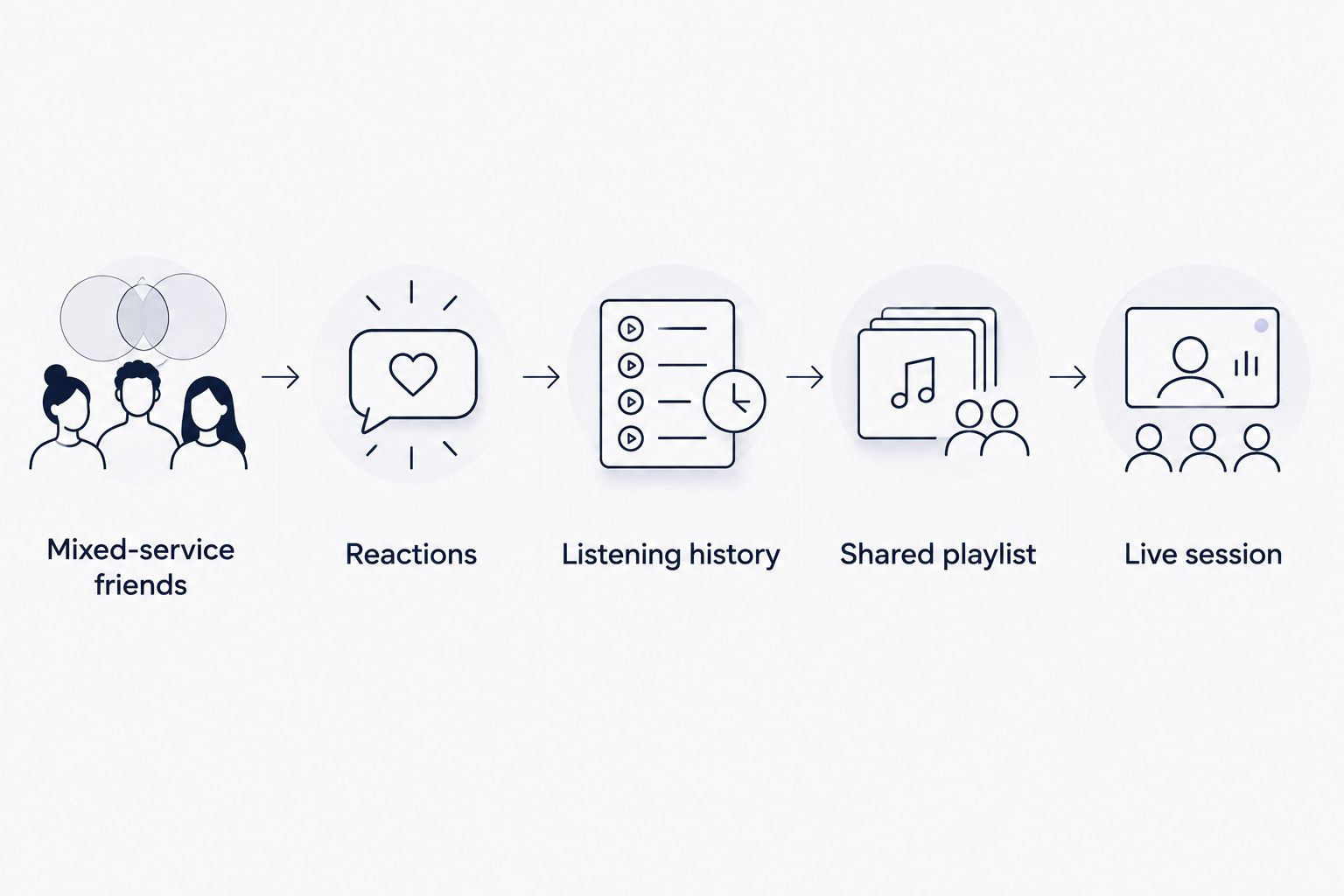
Your friends do not need the same kind of music sharing. A shared playlist answers, What should we play? Friend activity answers, What did you play? A live session answers, Can we listen together now? Treating those as the same feature leads to the wrong app.
The service split matters too. Spotify users have Spotify's social tools. Apple Music users have Apple Music's social tools. If your group uses both, check what each option shows before asking anyone to change where they listen. In 2026, that is the first question for a mixed-service group, not the size of an app's feature list.
What makes the best music sharing app for college students
Use these criteria before choosing from the table. An app that wins on one can be the wrong pick on another.
- Service fit: Does it work for the services your actual friends use, or only for friends inside one service?
- What gets shared: Is the result listening activity, a history, a playlist, or a live session? Those are different jobs.
- Effort: Does listening appear without a separate post, or does someone have to make and share something?
- Timing: Do you want a current snapshot, a daily view, a long-term record, or music playing together now?
- Participation: Will everyone get something useful if only some friends install the app or join a session?
- Control: Before connecting a listening account, check the app's current sharing settings. Do not assume every service handles visibility the same way.
For a 2026 group chat, start with the first two criteria. A playlist can be useful even if nobody shares listening activity. It cannot tell you what each friend actually played that day.
At a glance
| App or feature | Best for | Standout feature | Key limitation |
|---|---|---|---|
| Daycut | Mixed-service friends | A daily cut of up to 10 tracks from connected listening | iOS only |
| Airbuds | Reactions | Social activity built around friends' listening | Reactions are the point; not a long-term listening diary |
| Last.fm | Listening history | Scrobbling builds a record of plays | A record is not the same as a group feed |
| Spotify Blend | Shared playlist | Combines friends' music tastes in a playlist | Does not show a daily account of each friend's plays |
| Apple Music SharePlay | Live session | Friends listen together in a shared session | Requires people to join the session |
The table separates five jobs, not five versions of one feature. In 2026, choose the job first. Then check which friends can take part.
1. Daycut: best music sharing app for mixed-service friends
Best for: Students on iOS whose friends listen across Spotify, Apple Music and Yandex Music.
Connect a supported music service and the app automatically shares a daily cut of up to 10 tracks with friends. You see what friends played today in one feed. Nobody has to make a playlist or write a post for their listening to appear.
That makes the choice concrete. If one roommate uses Apple Music and another uses Spotify, a feature confined to either music service does not give the group the same shared view. The daily format also differs from a live status: you can see the day's listening rather than needing to look while a friend is playing something.
Daycut pros:
- Connects to Spotify, Apple Music or Yandex Music.
- Shares a daily cut automatically, with up to 10 tracks.
- Shows friends' daily listening in one feed across the supported services.
Daycut cons:
- iOS only; it is not the pick for a group that needs an Android app.
- A daily cut is not a complete, long-term record of every play.
- It does not replace a live group-listening session.
Verdict: Buy if the group wants to see what friends actually played across services. Skip it if the requirement is a shared live queue or a detailed listening archive.
2. Airbuds: best music sharing app for reactions
Best for: Friends who want listening activity to start a conversation.
Airbuds centers social interaction around what friends listen to. Its appeal is not just finding a track. It is seeing a friend's activity and responding to it, the way you would respond to something they shared directly.
That makes Airbuds a different decision from a passive listening record. Ask your friends whether they want to react to each other's music. If they do, that social layer matters more than the length of the history. If they only want a quiet answer to What did everyone play today?, reactions are not the deciding feature.
Airbuds pros:
- Puts friends' listening activity at the center of the experience.
- Gives friends a way to respond to music activity.
- Fits a group that wants music to prompt conversation.
Airbuds cons:
- The social layer adds little if friends only want to observe listening quietly.
- It is not the clearest choice when the requirement is a long-term personal play archive.
Verdict: Buy for a group that will use reactions. Hold if nobody plans to respond to what appears in the feed. Check Airbuds' current service support and platform requirements before asking a mixed-service group to install it.
3. Last.fm: best music sharing app for listening history
Best for: Students who want to keep a record of what they play over time.
Last.fm uses scrobbling to record listening activity. That makes it useful for looking back at artists and tracks, rather than only checking what a friend is hearing right now. A listening history answers a different question from a daily social feed: What have I played over time?
It also changes what you need to set up. Check Last.fm's current instructions for the music service you use and confirm that your plays are being recorded. Do that before relying on a profile as a complete account of your listening. A missing connection means a missing record.
Last.fm pros:
- Built around a persistent record of listening.
- Lets you inspect past plays rather than only a current status.
- Fits people who care about their own listening history as well as friends' histories.
Last.fm cons:
- Requires working scrobbling for the service and device you use.
- A personal history is not the same thing as an easy daily group feed.
Verdict: Buy for a listening archive. Skip it as the sole solution if the group wants a quick daily view of what each friend played. Last.fm's scrobbling documentation is the source to check for current connection steps.
4. Spotify Blend: best music sharing feature for a shared playlist
Best for: Spotify friends who want music to play together later.
Spotify Blend creates a playlist based on the listening tastes of its participants. The output is music to open and play. It is not a report showing each participant's listening in chronological order.
That distinction matters in a dorm or group chat. If the question is What should we put on?, a playlist gives you an answer. If the question is What did my friend listen to today?, opening Blend changes the question rather than answering it. Spotify's Blend help pages describe the feature as a shared playlist, while its Friend Activity documentation covers listening activity separately.
Spotify Blend pros:
- Produces a playlist the group can use.
- Reflects participants' music tastes in one place.
- Fits friends who already use Spotify and want a shared music pick.
Spotify Blend cons:
- Does not provide a daily account of each friend's plays.
- Is not the cross-service answer for friends who listen elsewhere.
Verdict: Buy when you need a shared playlist. Skip it when your real goal is to see what friends played. In 2026, do not treat playlist matching and friend activity as interchangeable.
5. Apple Music SharePlay: best for listening together live
Best for: Friends who want to take part in the same listening session.
Apple Music SharePlay is about participating in a session together. That is useful when friends are present and want to hear music as a group. It does not provide an ongoing daily feed of what those friends listened to on their own.
Use it for the moment it serves. If everyone wants to listen together now, start with the live-session option. If you want to catch up on friends' listening after classes, use an activity-focused option instead. Apple's SharePlay documentation covers the session mechanics; Apple's guidance on seeing what friends listen to describes a separate social feature within Apple Music.
Apple Music SharePlay pros:
- Serves the specific job of listening together live.
- Makes sense when friends have already agreed to join a session.
- Keeps the focus on what the group is playing now.
Apple Music SharePlay cons:
- Friends have to join; it does not passively collect a day's listening.
- A live session does not solve the mixed-service daily-feed problem.
Verdict: Buy for a planned listening session. Skip it as a substitute for seeing what friends played throughout the day.
How we ranked these options
The order follows the query: music sharing apps for college students. Seeing friends' listening across services comes first. Reactions, a listening archive, a shared playlist and a live session each get their own slot because each produces a different result.
This is a use-case ranking, not a claim that one feature beats every other feature. The comparison uses the stated app mechanics and the providers' own feature descriptions: Spotify's Friend Activity and Blend help pages, Apple's Music and SharePlay guidance, Last.fm's scrobbling documentation, and Airbuds' app description. For 2026 setup and eligibility, read the provider's current instructions before connecting an account or inviting friends.
Which music sharing app should you choose?
Choose Daycut if your college friends are split across Spotify, Apple Music and Yandex Music and you want to see what each person played today. Its automatic daily cut is the closest match to that request. You can start from the app's site, then connect a supported music service on iOS.
Choose Airbuds when the group wants to react to listening. Choose Last.fm when the record of past plays matters most. Choose Spotify Blend when you need a shared playlist. Choose Apple Music SharePlay when everyone wants to listen together now. None of those choices needs to stand in for a different job.
FAQ
What's the best music sharing app for college students with friends on Spotify and Apple Music?
Daycut is the best fit for an iOS group split across Spotify and Apple Music. It connects to either service and shows friends' daily cuts in one feed.
Can friends share music listening across Spotify and Apple Music?
Yes. An app that connects to both services can show friends' listening across them. Check that the app supports each person's service and device before the group installs it.
Is Airbuds better than Last.fm for friends?
Airbuds is the better fit for friends who want to react to listening activity. Last.fm is the better fit for people who want a record of plays over time.
Does Spotify Blend show what a friend listened to today?
No. Spotify Blend makes a shared playlist based on participants' tastes. It is not a daily log of each friend's plays.
Is Apple Music SharePlay a music-sharing app for daily listening?
No. Apple Music SharePlay is for listening together in a session. It does not replace a daily feed of what friends played separately.
What's the difference between friend activity and a shared playlist?
Friend activity shows listening; a shared playlist gives you music to play. Pick activity to answer what friends heard, and a playlist to answer what the group should put on.
Can Android users install Daycut?
No. Daycut is an iOS app. A group that needs an Android option should check another app's current device support before choosing it.
Do I have to post tracks manually to share my daily listening?
Not with Daycut. After you connect a supported music service, it automatically shares a daily cut of up to 10 tracks with friends.
One last thing
Before inviting the whole group, ask one friend on a different music service to try the same option. The deciding test is whether you can both see the kind of music sharing you came for. A playlist, a play history and a daily friend feed can all work as designed while answering different questions.